This is a critical setting, unless this is set
correctly maps will not be found.
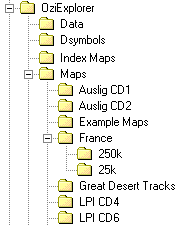
In the example showing the folder tree, if the drive is "c" drive, the Map File Path will be -
"c:\OziExplorer\Maps"
|
Home | Ozi Home | Features | Screen Shots | Optional Extras | Development | GPS FAQ | Support | |
Frequently Asked Questions - Searching for another map
(There are two sections -
1. Changing maps while in "Moving
Map" mode (and Track Replay)
2. Finding Maps using one of
the many "Find Maps" options
| 1. Moving Map Mode |
This is a map search which occurs while
Moving Map is running and it is necessary to load a new map. An
example of this is when your direction of travel takes you off the current
map, OziExplorer automatically changes to the next map.
(a) Map File Path (This is the path set in "Configuration"
/ "System" tab)
|
This path and any sub-folders attached to it will always be searched during
a
search for another map unless the path is locked (see Section 3. below).
In the example showing the folder tree, if the drive is "c" drive, the Map File Path will be - "c:\OziExplorer\Maps"
|
(b) Include in Moving Map
This option is a set in map calibration ("Check Calibration of Map" / "Options"), the default setting is "ON".
Once you have ticked this option (ON), the map will be used in Moving Map. It will be checked when your position moves off the existing map and the software is attempting to locate the next map to automatically load.
 (The Moving
Map Control buttons)
(The Moving
Map Control buttons)
(c)
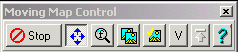
Locking to current map path (by selecting the button
 on the Moving Map
Control)
on the Moving Map
Control)
Note: This setting is NOT the same as the "Locking To Current Map path" in Finding Maps in Section 2 below.
If this button is depressed, the search will only occur in the folder which contains the currently loaded map. This search will be initiated when searching for a new map (when leaving the current map) or checking for a more detailed map (see 1 (d) below).
If the button is not depressed then the "Map File path" and its sub-folders will be searched.
(d) Check
for more Detailed Map (this button
 is on the
Moving Map Control)
is on the
Moving Map Control)
If this button is depressed then OziExplorer will search for a more detailed map at the interval that has been set in configuration. If a more detailed map is found then it will be loaded.
The path searched to find a more detailed map will depend on whether the path is Locked to the Current Map Path (see section 1 (c) above).
(e) Find Maps at GPS Position
(this button
 is
on the Moving Map Control)
is
on the Moving Map Control)
Clicking this button will initiate a search for a map the same as "Finding Maps" (see section 2 below).
| 2. Finding Maps |
Some of the ways this map search can be initiated are -
clicking the "Find Maps" toolbar button
selecting one of the options on the "Maps Menu" - "Find Maps"
selecting the "Find Maps at Cursor" option on the popup menu (right mouse click on the map)
clicking the "Find Maps" button on the Track List
clicking the "Find Maps at GPS Position" button on the Moving Map Control
This section will help you -
configure OziExplorer for where you put your map files.
decide how to structure the folders on your hard drive for your map files so that map finding works correctly.
(a) Map File Path (This is the path set in "Configuration" / "System" tab)
Same as for Finding Maps, see section 1 (a) above.
(b) Location of maps
For a map folder to be searched it must be either the Map File Path or attached
to the map file path (a sub-folder).
(Subject to Locking to current path, see (c) below)
In the example, "Auslig CD1" is a sub-folder of the "Maps"
folder. If the Map File Path is set to "c:\OziExplorer\Maps" any maps in the "Auslig
CD1" folder will be found.
(c)
Locking to current map path
This done by -
clicking the "x" on the "Find Maps" toolbar button
selecting the "Lock To Current Map Path" option on the "Maps Menu" - "Find Maps"
When this is done, only maps in the same folder as the currently loaded map will
be searched.
In the example (diagram above), if the current map is a 1:25k map in the
folder "..\France\25k", clicking on the east arrow on the Find Maps toolbar
button (to find a map to the east of the current map), only the folder "25k"
will be searched for a map and if an adjoining 1:25k map is found in this folder
it will be loaded.
Note: When this option is selected the Map File Path set in configuration is
ignored.
(d)
Re-indexing Maps
While not usually required, it is possible to re-index all the maps by choosing
the "Re-index Map Files" option on the "Maps Menu".