
 for GPS Navigators (with Windows CE Mobile and Core O/S)
OziExplorerCE GPS
Mapping and Real Time Tracking Software
This is the official web page for the OziExplorerCE GPS
Mapping Software which will work with most GPS receivers for real time tracking of GPS position (Moving Map).
| Last Updated
June 2017 |
 |
"Course Up" map rotation
 3D perspective view
|
 |
|
|
 |
|
|
|

PDA's
Supported
Information on iPhone, Android, Windows Phone 7/8 and Symbian O/S - click here.
- GPS / PND's - running wince core versions 4,5
and 6. See our PND FAQ
- PocketPC - Windows Mobile 6 and 6.5 Classic and Professional. WM6
Standard (for phones with small non-touch screens is not supported)
- PocketPC - Windows Mobile 5
- PocketPC - (Windows Mobile 2003) PC2003 (CE version 4.2+)
- PocketPC - PC2002 (CE version 3.0+)
- PocketPC - PC2000 (CE version 3.0+)
ARM , MIPS , SH3 , SH4 , and Intel PXA2xx cpu's (Xscale) are supported for all platforms where applicable.
OziExplorerCE will not run on
- PDA's using Windows CE version 1.
- Smartphones (or any PDA) which have a non-touch screen.
- Palm Pilots and any other PDA not using the Pocket PC / Windows CE operating system.
- Palm Sized PC's (older Windows CE based PDA's)
- Handheld PC's with CE version 2.00 and 2.11
|
|
Note - No useable maps are provided
with OziExplorerCE, only example maps. |
|
|
OziExplorerCE is moving map software for PocketPC's and Window CE PND
Navigators
which use the WinCE core operating system. It
uses raster map images which are either scanned or purchased in digital format.
It allows you to track your position received from a GPS on a map (moving map).
OziExplorerCE is not automatic route planning software, you cannot request the best way to get
from point A to point B, the types of maps OziExplorerCE uses do not allow this. However OziExplorerCE will allow you to create your own routes on the
map and navigate along those.
The design philosophy is you plan your trip using the full PC OziExplorer on you PC and
then transfer your waypoints and other data to your PDA for use by OziExplorerCE.
|
|
OziExplorerCE runs on PocketPC and Windows CE GPS / PND's but it relies on map
calibrations etc to be provided by the full PC version of OziExplorer, in this respect OziExplorerCE can be considered an add-on to the full Oziexplorer software, you also need
the full OziExplorer to calibrate maps, plan trips by adding waypoints etc.
The unregistered OziExplorerCE will work with the unregistered OziExplorer
but the limitations of both packages will apply.
To get the full use of OziExplorerCE you
must have a full purchased copy of OziExplorerCE and a full purchased copy of PC
OziExplorer.
Main Features
There is a detailed list of
features here
- Uses almost any map which can be created by the PC version of OziExplorer.
- Moving map navigation using any GPS providing NMEA output in one of the supported
sentences.
- Design the screens used in OziExplorerCE using the PC based designer
software.
- Course Up Mode.
- 3D Perspective View Mode.
- Automatic loading of the next map.
- Automatic Route prompting with user created routes (voice and symbol).
- Create Route on screen using the stylus.
- Check for more detailed map at a set interval.
- 5 user tracks can be loaded
- Tracks can be created on the map using the stylus
- Logging of Track points to file.
- Create Waypoint at current position * Create Waypoints using the Stylus.
- Drag Map Objects to new position.
- Many Map Zoom levels.
- Various Position display formats.
- On screen display of Speed and Bearing.
- Speed Monitor (plays sounds (wav files) when set speeds exceeded).
- Display Waypoints on the map.
- Find Maps at cursor position.
- Name Search * Log Book
- Satellite View * Map View
- + much, much more.
|
|
|
 |
|
|
 |
Gps Requirements
- All Windows CE based GPS / Navigators /PND's now available have a built in GPS.
Map Requirements
- Maps of your particular area of the world which you can scan or purchase
in digital format which can be converted to the ozf4 format. Map images in
the ECW format can be used without conversion. See
the "Using Maps in CE" page for more
information.
- To convert maps to the ozf4 format, a
conversion utility called Img2Ozf is available for download from this web
site. The ozf4 is a
special format developed for use in OziExplorerCE (details are in the
Img2Ozf help document). The
format allows paging of the image from disk and therefore requires little memory for image
display.
- Note - No useable maps are provided with OziExplorerCE, only example maps.
Vector Maps
OziExplorerCE does not support any vector map formats.
Download
OziExplorerCE Version 2.44a -
This download is for new installations, upgrades and
evaluation before purchase.
If you are upgrading from a previous version please read "History of Changes"
(link below)
This is a trial / evaluation version with restrictions until
purchased
This is what you need
- You must download the installation file to suit your particular
GPS / Navigator Type.
- OziExplorerCE Screen Designer. (See below for information about the
Screen Designer).
- You must also download the Img2Ozf program (essential)
to convert your map images - see the Map
Requirements section above.
For more information about
Img2Ozf and download click here.
Any issues found with program operation
please report them to
info@oziexplorer.com
|
GPS Navigator Type |
File to Download |
To Install - download
the file and run it to install. Installation Notes |
|
Navigator |
GPS / Navigators running
Windows CE OS 4, 5 and 6 There are many Chinese made Navigators available on eBay and
other places which can run OziExplorerCE.
If you have a device which uses a x86 or mips CPU (very rare)
please contact us for a special download link.
|
 OziExplorerCE Software OziExplorerCE Software
This is the download that is most likely needed to run OziExplorerCE on a
Navigator. We refer to these as a wince core arm device. |
The GPS / Navigators which
use the WinCE "Core" OS may be devices which are dedicated to particular
tasks such as running specific navigation software.
1. Download the file and manually copy it to the
device
or Memory card using windows explorer. 2. Configure your navigator
to run the program - most Chinese Navigators have the ability in their setup to specify which
program is run when the GPS Software option is clicked. |
 
Funtrek / Endura |
Holux Funtrek 130 / 132
Lowrance EnduraIf you have one of these devices there are special
versions of OziExplorerCE to support the special features these devices
have. |
Device specific versions
Click here to download these Versions |
|

Windows Mobile and Pocket PC |
Windows Mobile 5, 6 and 6.5 Pocket PC's.
Pocket PC 2003
Pocket PC 2000 and Pocket PC 2002These devices are no longer manufactured
but OziExplorerCE will run on the older devices. |
Device specific versions
Click here to download Pocket PC Versions |
The "Windows Mobile Classic" (Pocket PC) and "Professional"
(Pocket PC with Phone) Operating System versions are supported. The "Windows
Mobile Standard" version (for small non-touch screen phones) is not
supported. |
|
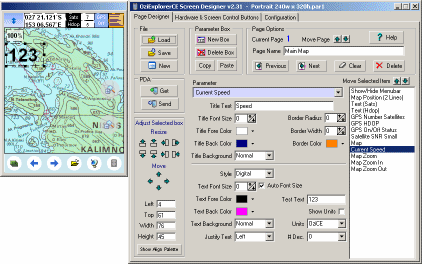
OziExplorerCE Screen Designer
The Screen Designer can be used by the user to design or
modify the screens displayed by OziExplorerCE
|
One of the features of OziExplorerCE is the ability to display
many different screens by paging through them, these screens can be designed on
the PC by use the "OziExplorerCE Screen Designer" program.
OziExplorerCE allows the commands performed by the hardware
buttons (Pocket PC's only) and OziExplorerCE Screen Control
buttons to be configured by the user. This is done by the Screen Designer
program which runs on a PC.
Download OziExplorerCE Screen
Designer (version 2.36) - works with OziExplorerCE version 2.42 and above.
Click here
to view a YouTube video of OziExplorerCE in use. In the video the
OziExplorerCE screens/pages have been designed using the OziExplorerCE Screen Designer.
|
|
 |
Purchase OziExplorerCE
OziExplorerCE can be purchased using the Buy Now option on the left
hand menu of the web page.
These are the limitations of the Trial / Evaluation version.
- Moving map mode (communication with the GPS) will only remain active for 20 mins each
time OziExplorerCE is run and then 10 mins after that (until restarted). At the end of
these times a dialog will be displayed and communication will be deactivated.
- A watermark using the text "TRIAL" will be drawn onto the map.
Other than for the restrictions mentioned above, the evaluation version works
exactly the same as the purchased version.
OziExplorerCE Help
|
 hits since October 2001
|
[
Home ] [
OziExplorer ] [
OziExplorerCE ] [
OziExplorer3D ] [
Purchasing ] [
Maps ] [
Utilities ] [
Support ] [
Links ] [
Future Changes ] [
Information ] [
Australian Page ] [
Site Map ]